My Favorite New Features in visionOS 27
Today’s the day visionOS 27 rolls out officially worldwide – alongside, of course, its corresponding updates oniOS, iPadOS, watchOS, macOS, and tvOS. It’s a big day! Having lived with visionOS 27 all summer, I thought I’d share a handful of my favorite features in case you’re updating today or just curious about what’s new in spatial computing.
Siri AI
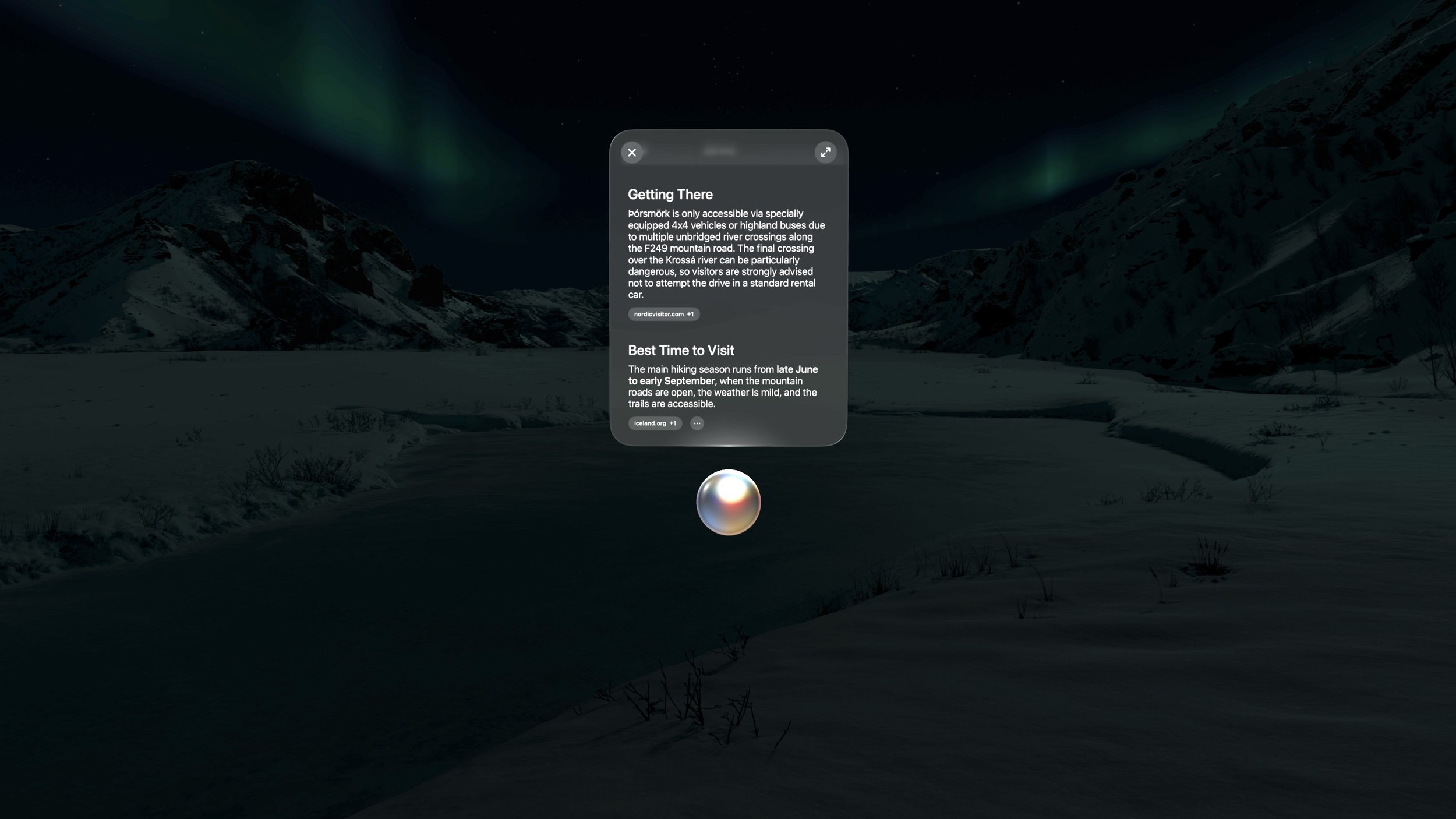
This is the major change across all of Apple’s platforms this year, and it’s good see visionOS getting not only the full Siri AI treatment, but a version of Siri AI custom-built for a spatial interface. Siri appears in your space as a white orb when invoked via voice or a new hand gesture where you pinch and hold the Home button. Of course, there’s also the Siri app, where conversations with the assistant from all of your devices are collected and synced.
Once Siri appears, you can pin it to a surface and leave it there to chat with anytime by simply looking at it. It’s kind of cool having a helpful orb in the room with me, always ready to jump in when needed. Being able to ask Siri about window contents and real-world surroundings with Visual Intelligence is nice, too, and it comes with a fantastic animation of Siri scanning your environment.
I’ve found the new version of Siri to be much more capable than its predecessor. It’s great for asking world knowledge questions as well as for digging up information buried in your own messages, emails, notes, events, and files. Now that visionOS 27 is out publicly, I look forward to seeing how developers integrate with the new and improved Siri. If I could ask Siri about old journal entries and day plans the way I can about messages, that would be amazing.
Siri is still meant to be an assistant, not a friend or a constant chat mate, and I think that’s as it should be. It’s just as present and helpful as it needs to be without getting in the way of the vast majority of things I want to do without any AI input. Apple did a good job.
Notifications
I haven’t been a fan of the way visionOS handles notifications since its inception, but things have gotten a lot better this year thanks to glanceable, interactive notifications. Before, a notification would display nothing but the app’s icon, forcing you to open Notification Center or the full app to see any actual information. Now, you can peer into a notification to see what it says just by glancing at it.
I keep my notifications to a minimum – mostly just text messages, emails, and critical house alerts. Thanks to these new expanding notifications, I can now check who a message is from and decide whether it’s worth responding to before I leave the context of what I’m working on. And if a message just needs a quick reply, I can do that directly from the notification as well. Less time dealing with notifications is a big win in my book.
Thórsmörk Environment
The immersive environments on Vision Pro are incredible, and Apple does a great job of selecting the perfect places to capture them. This year, it’s a spot in Thórsmörk, Iceland, featuring a slow-moving river, snow-topped mountains, and the Northern Lights at night. It’s mesmerizing and a fantastic place to focus or relax.
Panoramas
visionOS still doesn’t support third-party environments, but the addition of panoramas to the mix is a nice step in the right direction. The ability to immersive yourself in massive panoramas has long been one of the Vision Pro’s go-to selling points, and visionOS 27 makes that experience even better. Panoramas can now be converted to 3D spatial scenes, adding depth and perspective similar to what we saw with regular photos last year. And you can set your own panorama or one you download online as your environment. Panoramas don’t include movement, and they don’t cover your full field of view the way immersive environments do, but it’s still great to have the option to use your own favorite images as a backdrop for windows as you’re working.
Web Environments
Web developers can integrate 3D environments into their sites, offering visitors on the Vision Pro the ability to immerse themselves in unique spaces as they browse. Web environments can include special zones and screens for viewing embedded videos as well. It’s going to be a while before we see spatial web elements like environments be adopted on any sort of scale, but they’re fun to experience and could prove to be useful down the line when spatial browsing expands to more devices.
Curved Windows
A few of Apple’s apps are now able to add curvature to windows. The TV app’s multiview feature, which can be used to watch multiple MLS, F1, and Friday Night Baseball feeds at once, now curves to make it easier to take in everything happening around you. Freeform windows curve at a certain width as well so you can see all of the content in a workspace. And Safari includes a new multi-tab view that curves around you so you can browse and navigate multiple pages at once without switching between tabs. I find this approach a lot easier than opening multiple Safari windows manually.
I hope that this limited rollout is a preview of what’s to come for visionOS windows in general. Sometimes, I want a window to be really big, and I’d like any app – from Apple or a third party – to have the ability to adapt as it grows for the sake of comfort.
Quality-of-Life Improvements
Besides Siri AI, the big push in Apple’s OS updates this year is system improvements. Across the board, bugs are being squashed, and things are just getting smoother. visionOS hasn’t been left out of that, with notable improvements including a redesigned Control Center for better access to settings (including, for the first time, AirPlay settings right in Control Center!), full-quality screen captures and recordings, and much faster connection to Wi-Fi upon booting up. Restarting my Vision Pro used to feel like a chore because it took forever for the device to connect to the internet and start syncing data. Now, I literally can’t unlock the thing fast enough to see it connect to the network.
It’s a good year for visionOS. The platform was fully included in the big Siri AI push, it got some nice feature additions and day-to-day improvements, and developers now have access to new tools like Reality Composer Pro 3 to make building experiences for Vision Pro easier. The OS feels more settled and mature in some ways, but at the same time, it’s also experiencing changes in pretty fundamental areas, like notifications and Control Center. Spatial computing is still an exciting space to be a part of – or just to keep up with, if you’re still waiting for the right time to jump in.
Whichever group you fall into, thanks for reading, and enjoy all the great OS updates out today!